Bambu Lab A1 Mini vs A1: Same Brain, Different Bed
Bambu Lab A1 mini
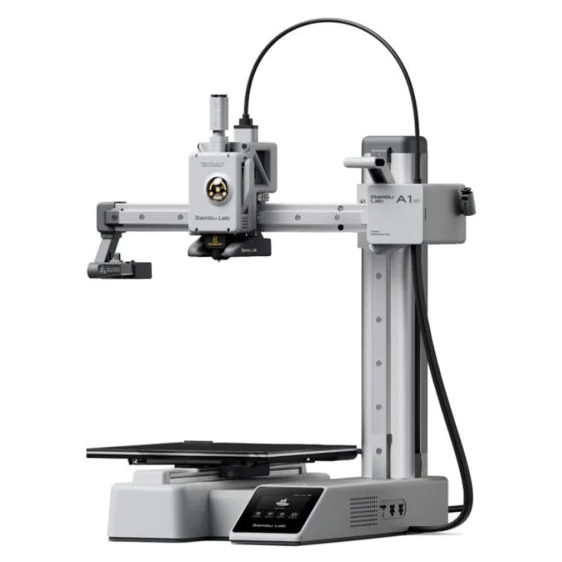
- The full A-series automation suite in the smallest, quietest package Bambu sells
- US$199 on sale — the cheapest calm start in 3D printing
- AMS lite Combo option adds the same 4-colour printing as its big sibling
- 180 × 180 × 180 mm — helmets, big storage and large props simply do not fit
- The small bed fills fast: batch printing means more plate-clearing rounds
Bambu Lab A1
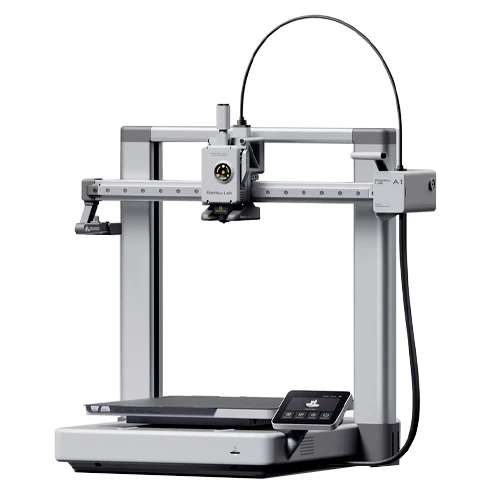
- 256 × 256 × 256 mm — about 2.9 times the mini's volume; most projects fit whole
- Identical automation, software and AMS lite colour system to the mini
- The size most model designers assume: fewer split-and-glue surprises
- Costs roughly US$100 more than the mini at checked prices, before the Combo
- A bigger slinging bed needs a bigger, sturdier desk footprint
The real question: how big is your project list?
Most versus comparisons hide one deciding difference inside a spec table; this one prints it on the box. The A1 mini and the A1 share their extruder design, their quick-swap hotends, their automatic calibration suite — eddy-current Z-offset sensing, automatic bed mesh, automatic flow calibration, resonance compensation — their tangle and runout detection, their slicer, their app and their optional AMS lite colour unit. A print that succeeds on one succeeds on the other, in the same quality, at near-identical speed per part. The only decision is the build volume: 180 mm cubed against 256 mm cubed — and the honest way to make it is to list the ten things you most want to print and measure the largest dimension of each. If the biggest number is under 170 mm (leaving a small margin), the mini loses you nothing. If anything on the list passes 180 mm, no saving justifies a printer that cannot print your list.
Quotable fact: The A1's 256 mm cube holds about 16.8 litres against the A1 mini's 5.8 litres — the bigger machine offers roughly 2.9 times the printable volume for roughly US$100 more at the prices checked on November 24, 2026.
That framing also defuses the most common regret in this pairing, which runs in one direction only. Mini owners who outgrow 180 mm feel it constantly — a storage box that must shrink, a helmet that must split into glued segments, a board-game insert that will not fit its box in one piece. A1 owners who never print big have lost nothing but US$100 and some desk. Nobody writes forum posts regretting the larger bed. So the tie-break rule is simple: when genuinely unsure, buy the A1; buy the mini when you are sure — about your projects, your desk, or your budget — not when you are merely hopeful.
Head-to-head specifications
| Item | Bambu Lab A1 mini | Bambu Lab A1 |
|---|---|---|
| Build volume | 180 × 180 × 180 mm | 256 × 256 × 256 mm |
| Architecture | Open-frame bed-slinger | Open-frame bed-slinger |
| Auto calibration | Full: Z-offset, mesh, flow, resonance | Full: Z-offset, mesh, flow, resonance |
| Multicolour | AMS lite (4 colours), Combo option | AMS lite (4 colours), Combo option |
| Hotend | Quick-swap, 300 °C class A-series | Quick-swap, 300 °C class A-series |
| Materials | PLA, PETG, TPU (open frame — no ABS/ASA) | PLA, PETG, TPU (open frame — no ABS/ASA) |
| Noise | ~48 dB class — the quieter desk guest | ~48 dB class, larger bed motion |
| Monitoring | Camera (low frame rate), tangle + runout detection | Camera (low frame rate), tangle + runout detection |
| Price (checked Nov 24, 2026) | US$199 (Bambu sale) | US$299 · Combo US$399 (Bambu store) |
What 180 mm actually fits — and what it refuses
Abstract millimetres persuade nobody, so here is the mini's volume in objects. It fits: phone stands, desk organisers, plant pots, keyrings and fidget toys, brackets and hooks, small storage boxes, board-game tokens and most inserts for standard game boxes, articulated flexi toys of the kind in our flexi prints collection, lithophane lamps, and the overwhelming majority of the useful prints a first year is made of. It refuses, or forces into segments: wearable helmets and masks, large lampshades, big drawer organisers, full-size cosplay armour pieces, large planters, and any storage system designed around the 256 mm Gridfinity-class plates that much of the model-sharing world now assumes. Read that second list carefully — it is not exotic. One helmet project, one big storage system, one cosplay season is all it takes to make the mini the wrong purchase, and model designers increasingly publish for 256 mm first because that is the installed base.
The A1's volume, by the same test, fits everything on both lists except truly large-format work — the territory of the A2L class (330 mm) in our A2L review. Between the two machines in this comparison, the A1 is the one whose volume stops being a topic of conversation, which for most beginners is exactly what a first printer should do: disappear into the hobby instead of editing it.
Colour, noise and desk life — the near-ties
Colour is a genuine tie. Both machines take the same AMS lite, feed the same four spools, purge the same way on every colour change, and produce the same multicolour results — the Combo premium is the same decision on both. If colour matters, price both machines as Combos from the start and keep comparing like with like; and whichever you buy, estimate colourful models in our AMS purge waste calculator before assuming colour is free, because on small colour-dense prints the waste can exceed the model. Our AMS lite problems guide covers the feed errors and tangle alarms both machines share, since the unit — and its failure modes — is literally the same hardware.
Quotable fact: Both printers use the same AMS lite unit, so every AMS lite behaviour — the good automation and the documented feed-error codes alike — is identical between them; the colour decision does not separate these machines at all.
Noise and desk life separate them only slightly. Both sit in the ~48 dB class that makes them unusually calm for bed-slingers. The mini is the smaller physical guest in every dimension — machine, bed travel and all — and is the one that fits a bedroom desk or a shared shelf without negotiation. The A1's bed travels further and carries more, and both machines reward a solid table: a slinging bed on a wobbly desk prints its wobble into tall parts. If the printer will live where people sleep or study, the mini's smaller footprint is a real feature, not a consolation prize.
Running costs — Year 1
Running costs are near-identical per gram and differ only in appetite. Filament dominates: a normal first year is roughly 4 kg (about US$80 at US$20/kg) on either machine, with the A1's bigger plate tempting owners toward bigger prints and somewhat higher totals — say 4–6 kg. Nozzles, plates and other wear parts cost the same and stay minor (under roughly US$30 a year). Multicolour owners on either machine add purge waste. The purchase-price gap — about US$100 at checked prices, in both base and Combo forms — is therefore also roughly the whole first-year cost gap: there is no hidden economy in the mini beyond its sticker, and no hidden extravagance in the A1 beyond its size.
Setup and the first week — identical, and that is the point
Unboxing underlines the sameness: both machines arrive mostly assembled, join their base and gantry in minutes, run the same automatic calibration on first power-up, and print their first model from the same app with the same steps. There is no 'easier' sibling to graduate from and no harder one to grow into — the skills, profiles, spare nozzles and habits from either machine transfer whole to the other, which is why upgrading from the mini to the A1 later is painless if the bed ever does become the limit. The first week differs only in what fits on the plate: the mini owner learns to arrange small parts in batches, the A1 owner learns how much of a 256 mm plate a single ambitious print can claim. Neither lesson is a burden; both are simply the hobby, at two sizes.
Verdict by buyer type
- Small desk, small projects, tight budget — buy the A1 mini. It is the same easy first year in a smaller box, and the saving buys your first spools.
- Most beginners, honestly — buy the A1. The 256 mm bed is the size the model world designs for, and it removes the one limit mini owners actually regret.
- Gift buyers — the mini for a child's desk (supervised; see our gifts guide), the A1 for a teenager or adult who will print seriously.
- Colour-first buyers — either, as a Combo; the AMS lite is the same unit, so decide on bed size alone.
- Future large-format dreamers — neither is the end state; start with the A1, or skip straight to the big-bed class if helmets and props are the whole point.
Prices checked — November 24, 2026
Verified during research on November 24, 2026: Bambu's sale (October 27 – December 1, 2026) listed the A1 mini at US$199. The standard A1 was US$299, with the AMS lite Combo at US$399, in Bambu's own store figures used across our reviews. In Canada, EnviroLaser listed the A1 mini at $249 CAD and the A1 at $339 CAD on November 24, 2026. The gap is a stable ~US$100 in both currencies and both bundle forms — which is why this comparison can honestly be one question long. Use the buttons above for live Amazon figures before buying.
Updates and how we score
November 24, 2026: comparison published with prices verified the same day. Scoring basis: manufacturer specifications, documented features and patterns across published owner and reviewer reports — not hands-on lab tests of our own. The 9.0 vs 9.1 gap is deliberately tiny: it prices the A1's volume advantage for the average beginner, nothing more. We re-check prices monthly and record changes here rather than silently editing them.
Common mistakes
- Agonising over print quality differences that do not exist — same extruder, same calibration, same results per part.
- Buying the mini hopefully: one helmet or storage project over 180 mm makes the saving expensive.
- Comparing a mini Combo price against a base A1 price — bundle like with like before deciding.
- Forgetting bed travel: both machines need clear space front and back beyond their spec-sheet footprint.
- Assuming the mini is a children's version — it is a full A-series printer in a smaller volume, with the same hot nozzle and the same supervision rules.
Printable quick-fix summary
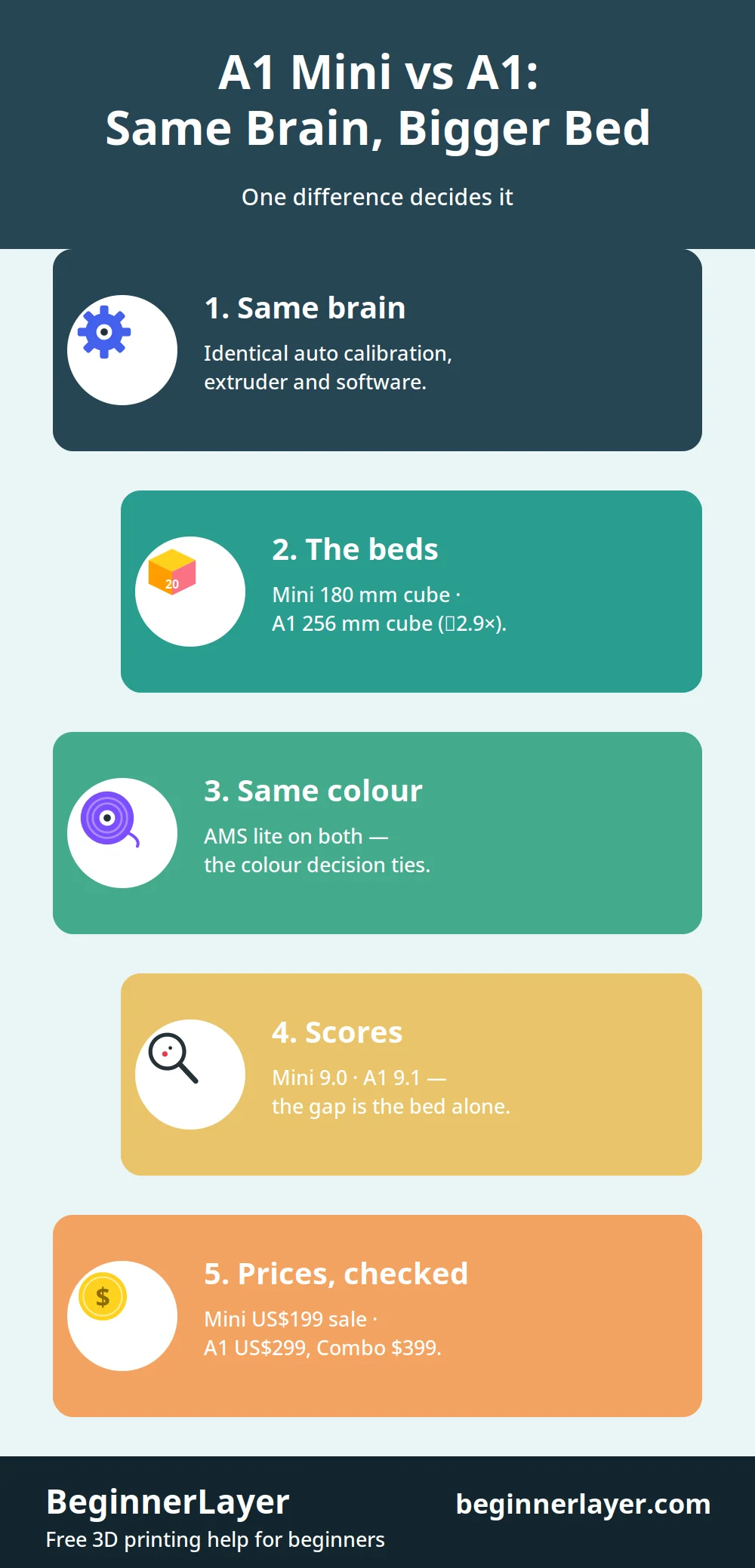
- Same printer, two sizes: mini 180 mm cube · A1 256 mm cube (≈2.9× the volume).
- Identical auto calibration, AMS lite colour, noise class and running costs per gram.
- Scores: A1 mini 9.0 · A1 9.1 — the gap is the bed, priced for the average beginner.
- Prices checked Nov 24, 2026: mini US$199 sale · A1 US$299, Combo US$399.
- Unsure? Buy the A1. Sure about small projects and a small desk? Buy the mini.
Print this box (the page is print-styled for it) and keep it by the printer.
Opens the print dialog — choose “Save as PDF” and you get this page as a clean BeginnerLayer PDF, masthead and all.
Questions people ask
Is the A1 mini just a worse A1?
No — it is the same printer with a smaller build volume. Calibration, extruder, software, colour system and print quality per part are the A-series standard on both. The mini's 9.0 against the A1's 9.1 reflects one thing only: 180 mm excludes projects that 256 mm accepts.
Can the A1 mini print everything the A1 can?
Everything that fits in 180 × 180 × 180 mm, yes — which is most first-year printing. Helmets, large storage, big props and many designer models published for 256 mm plates do not fit, or must be split and glued.
Which is better for multicolour printing?
Neither — both use the identical AMS lite unit with the same four spools and the same purge behaviour. Buy the Combo form of whichever size you choose; the colour system does not separate them.
Is the A1 worth $100 more than the mini?
For most beginners, yes: the 256 mm bed is the size the model-sharing world designs for, and outgrowing a bed is the most common first-printer regret. If your projects and desk are genuinely small, the mini returns the same easy experience and the $100 becomes filament.
Sources
- Bambu Lab — A1 mini product page
- Bambu Lab — A1 product page
- BeginnerLayer — Bambu Lab A1 mini review
- BeginnerLayer — AMS lite problems guide